Tuesday, February 16, 2016

Ansel Adams Day!!


Today you are going to read about Ansel Adams, a great photographer, that you could learn a lot from. Below is a link to help you answer the questions on the handout/worksheet.

http://en.wikipedia.org/wiki/Ansel_Adams

http://www.anseladams.com/ansel-adams-information/ansel-adams-biography/

When you are done with your worksheet, please find 3 examples of Ansel Adams work and put them on your blog with an explanation of who Ansel Adams was.  Please make this Blog Post #6.

Make it a great day!

Thursday, February 11, 2016

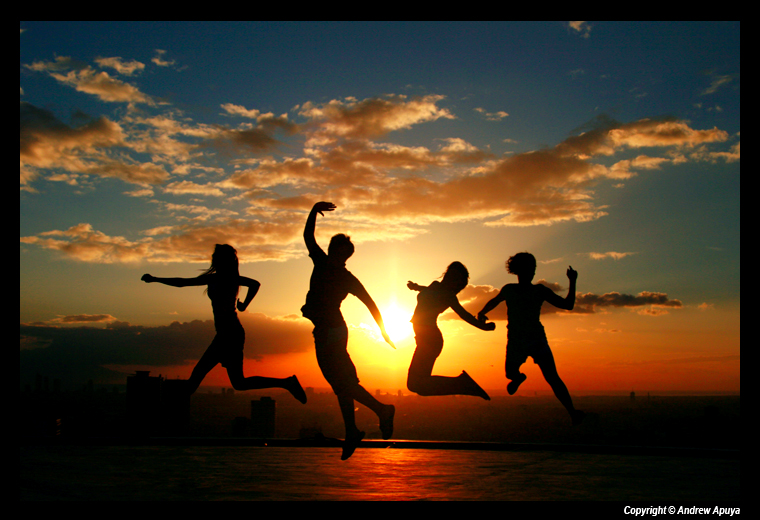
Backgrounds and Getting a great silhouette shot...

The key to taking a good photo is knowing how cameras work, understanding exposure and composing a great image.  Now that you have discussed these in class, you will begin taking photos to "Show What You Know" about photography.  Here are some areas to work on as you begin to take your first photos.  

First area to work on is backgrounds.  

http://digital-photography-school.com/getting-backgrounds-right

Read the link above and complete the handout on Getting Backgrounds Right. 


Second area is silhouettes.  


http://thedailydigi.com/how-to-photograph-a-silhouette/

http://digital-photography-school.com/how-to-photograph-silhouettes

http://www.lightroompresets.com/blogs/pretty-presets-blog/6162254-how-to-photograph-silhouettes-6-easy-steps

Read through these sites and complete the handout.  

After you have created your list, find a silhouette picture (online) that you would like to create.  Save the picture and post it on your blog as the picture you plan to recreate this week for your silhouette image.  This will be Blog Post # 5.

Tuesday, February 9, 2016

Introduction to Photographic Lighting

Before we can go any further in our photography, we need to learn about lighting.  Click the link below and complete today's handouts on lighting. 
Lighting

When you are done create Post #4 that shows the following examples of lighting:
1. Sidelight
2. Backlight
3. Natural/Soft light
4. Front Light/ Hard Light 

(You should have 4 photos total. Please number the photos, label what type of light it is and list where the photos are from). 

Monday, February 8, 2016

Getting the most from your Point and Shoot Camera

As we continue our week of looking at different types of cameras and exposure, I'd like you to read this article and complete the handout about getting the most from your point and shoot camera.  Our reality for this class is that most of you will be using a point and shoot camera and I want you to get the most from it.  

http://photo.net/learn/point-and-shoot-tips


Make sure to read the assignment for blog post #3 when you finish this assignment.  

Sunday, February 7, 2016

Exposure, BLog Post #3


Check out these photo examples

Over Exposed

UnderExposed

Correctly Exposed

After you have completed the worksheets for today, you will need to do a Blog Post #3 on your blog.  You will need to find a picture example that shows: correct exposure, over exposure and underexposure.  You can use your own pictures or find one from Google images.  Inside of post 3, post your picture with a label and an explanation of why this photo fit the label. 

Friday, February 5, 2016

Photography Basics...Getting started

So far we have discussed the different types of cameras, the different parts of a camera, and exposure.  Please spend some time today reading the articles linked below and filling in your review worksheets.  

It is a great explanation of how cameras work!

Some Photography Basics

Basic Photo Tips: Aperture, Shutter Speed, and ISO

Exposure and Camera Modes


Thursday, January 28, 2016

Tri County Intro to Photography

Welcome to the wonderful adventure of photography. This semester will be a lot of fun and a lot of work. You will be using this blog as a place for you to find information and links for your assignments. You will also use it as a place to post questions and your best work.


You will use the following webpages to learn the basic concepts related to photography. You will not have a textbook, therefore you will be responsible for reading the information on these pages and using it to complete any assignments given.


You will discover that everyone has their own ideas about what makes a great picture. Some people will cherish a picture because of the content, while others might love a picture because of the way it makes them feel. While both of these are valid reasons for loving a picture, as a photographer you will learn to see that every "great" photograph has specific photographic elements. Throughout this semester we will learn the photographic elements that make a picture "great."

In addition to this blog, you will each have your own photography blog. 

Tuesday, September 1, 2015

Post 2 What Type of Camera

         When I was a kid my mom had a small camera and used it occasionally for taking photos.  She captured my birthdays and major holidays, but that was about it.  I can remember loving photos and always wanting more.  When I was in elementary school I sold greeting cards and won a polaroid camera.  This was my first camera and that was when my love for photography began.  I worked hard to be able to upgrade to a better camera and in junior high went to a photography workshop at Lansing Community College.  
       In high school I worked in the school's darkroom and eventually became the yearbook photography editor.  I took photos at every school event and everywhere I went.  
       In college I worked at the Meijer Photo lab and worked as a wedding photographer.  After college, I became the Yearbook Advisor at Tri County and continue to take photos as a Freelance Photographer.  
     I currently use a Nikon D600 for all my photography.  I love Nikon SLR cameras and encourage everyone to join Team Nikon.


For your second photo blog post,  please write 1 to 2 paragraphs about yourself and your photography experience.  Please focus on these areas:
Introduce yourself and what your photo experience has been (when did you start taking photos etc.).
Explain what type of camera you use and what you use it for (online posting, printing etc.).

Sunday, April 12, 2015

10 Step Guide to Action Shots

Please read the link below and try some of the suggestions.

10 Step Guide to Action Shots 
Photo by Rob Patin


Thursday, November 20, 2014

Photos 5 (4 revised)

We are currently working on a new photo assignment named photos 5(4 revised).
Photos #5 are will be due on Tuesday, November 26
Name the dropbox folder Photos #5 and your name.


Using a digital camera, take 2 pictures of each assigned topic.

1. Texture


2. A Portrait of a Person of Influence


3. Self Portrait (make them interesting)


4. Frozen in Time (a stopped action shot--no blur)


5. Winter Wonderland snowscape--take two pictures that are landscape pictures with snow covered trees etc.  AVOID man made objects in your photo.


10 photos total.  


Remember your goal is to be the BEST photographer you can be and use Photoshop to make your photos look the best that they can look.  COMPOSITION and Correct exposure are a must!
PUSH yourself on this assignment to be your best!
Please read through these sites today:


Friday, November 7, 2014

Photo Tip Friday: the difference between snapshots and portraits

Photo Tip Friday: the difference between snapshots and portraits

When you are working on your portraits of your person of Influence, please make sure that you are choosing someone that has made an Influence on your life.  These portraits should show someone that has made a positive difference in your life.  

Before you submit your portrait, please make sure that it is a PORTRAIT and not a simple snapshot.  How do you tell the difference?  Well there are a lot of differences, but the most obvious is the amount of time you put into taking the photo.  A portrait is well thought out, planned for and most often posed.  You need to consider lighting, background and composition (just to mention a few).

This blog post linked HERE has good advice also.  

Please make sure to check your email for today's exit ticket questionaire.

Wednesday, November 5, 2014

Taking Pictures of People of Influence


Spend some time studying these photos taken of people of influence.  Pay special attention to how they use lighting and setting to create a feeling and flair in their photos.  Also, note how the people's personalities are shown through in the images.  This is what your goal is to do with this week's person of influence photos.  


Christopher Walken

Christopher Walken is a great example of a celebrity that was made even more popular through the internet in the 21st Century. While he has been in a string of movies, he is more famous throughout the Intertubes for his Saturday Night Live skit in which he demands “more cowbell”. Date: April 2003. Photographer: Mark Seliger.


HRM Queen Elizabeth II

There have been many iconic photos of the Queen, but this one taken by famous photographer Annie Leibovitz conveys her regality while presenting her in a state of contemplation accented by the eternally inclement English weather. Taken in Buckingham Palace, the shot caused a furor in the British tabloid press when Leibovitz asked the Queen to remove her crown. Date: 2007. Photographer: Annie Leibovitz.


Jacqueline Kennedy Onassis

Jacqueline Kennedy was America’s best-loved first lady, wife of John F. Kennedy. After JFK’s death, she married shipping tycoon Aristotle Onassis to the shock of the entire nation. While many photos were taken of Jacqueline Kennedy, this was her first official portrait as First Lady and the one most will remember. Date: 1961. Photographer: Mark Shaw.


Mother Teresa

At the time of her death in 1997, Mother Teresa’s Missionaries of Charity organization was running 610 missions in 123 countries. Date: 1986. Photographer: Túrelio.


Audrey Hepburn

This press shot from Breakfast at Tiffany’s is probably the most famous photo of Audrey Hepburn. Hepburn was plucked from a ballet lineup to play the leading role in Gigi on Broadway in 1951. She became only the third actor to be paid $1 million for her role in My Fair Lady. Date: 1961. Photographer: John Kobal.


Greta Garbo

Greta Garbo was a Swedish-American actress that starred in a number of movies from the silent film era to the “Golden Age” of Hollywood. Best known for “Camille” and “Ninotchka”. Date and photographer: Unknown.


Louis Armstrong

Louis Armstrong was a jazz musician that sang vocals and played various instruments, including the trumpet as pictured. He performed solo and with other performers right up until his accidental death in 1971. Satchmo’s image was immortalized in this photo. Date: 1953. Photographer: World-Telegram staff photographer.


Mae West

An American actress, playwright, screenwriter, and sex symbol. Known for her bawdy double entendres, West made a name for herself in Vaudeville and on the stage in New York before moving to Hollywood to become a comedienne, actress and writer in the motion picture industry. One of the more controversial stars of her day, West encountered many problems including censorship. Date and photographer: Unknown.


Marilyn Monroe

This was a scene from the movie “The Seven Year Itch”. The location shot in front of the Trans-Lux theatre in New York City had to be redone in the studio due to excessive crowd noise, but it yielded this picture. Date: 1954. Photographer: Matty Zimmerman.


Migrant Mother

This photo of Florence Owens Thompson and her children was taken in February or March of 1936 in Nipomo, California. In addition to being an iconic photo of the Great Depression, it influenced Steinbeck in his writing of The Grapes of Wrath. Date: 1936. Photographer: Dorothea Lange.


Your Assignment for Today:
Click on the link below and read the portrait lighting tutorial.  

Then Read
and type up a list of the 9 tips with an explanation for each.  
ALSO INCLUDE with this list a Top 5 tips for Self Portraits.  

Print out the list and turn it in.  


Monday, November 3, 2014

Pictures 4

Name the dropbox folder Photos #4 and your name.


Using a digital camera, take 2 pictures of each assigned topic.


1. Hallway Poster Picture (life at T.C.--classes, free time, sports)


2. A Portrait of a Person of Influence


3. Self Timer/Selfie


4. Frozen in Time (a stopped action shot--no blur)


5. Things that come in 2.


10 photos total.  


Remember your goal is to be the BEST photographer you can be and use Photoshop to make your photos look the best that they can look. I recommend trying some of the new actions when you edit these photos. COMPOSITION and Correct exposure are a must!
PUSH yourself on this assignment to be your best!
Photos are due Wednesday, November 12th.